1. E-learning:E-learning is the process of learning through the electronic media like computers. The concept of Distant Learning has become possible through the e-learning. One can get degree of a university through the e-learning. The CAL (Computer Assisted/Aided Learning) is an example of E-learning. Internet, Intranet, Extranet, Virtual Class room and Multimedia CD/DVD ROM are the tools used in E-learning. It has many advantages:
· Very flexible and cheaper
· Time saving
· Can be read any time and any where
· Course moves faster than traditional method
· Uniformity of content
· Interactive online session
2. E-commerce: The commerce through the use of electronic media is called E-commerce. It is the most popular and highly used advantage of IT. Replacing the traditional method of account controlling, quality and quantity controlling, money transaction, official and industrial management, etc. by the computers and electronic machines are some popular concepts of E-commerce. There are basically three types of E-commerce:
i. Business-to-Business
ii. Business-to-Customer
iii. Digital Middle Man
3. E-Business: The process of performing business activities through the electronic media, especially Internet is called E-Business. It includes selling, buying and servicing customers and collaborating with the business partners, too. It uses web-based technology for the advertisements and for the improved business performance. Some examples of this system are ebay, amazon, Alibaba etc
4. E-Governance: The process of governing through the use of Electronic media is called E-Governance. The traditional governing system cannot reach to the remote or rural area and it cannot address the actual problem of them. It is centered in the urban area. So, the E-Governance has become a popular concept of governing. It uses electronic media like Internet, Intranet, Wireless Phone, E-voting, E-commerce, E-health service and E-education, etc to address the problem of the people. It increases the speed of working of Government. The following are the E-Governance models:
i. Government to Citizens (G2C)
ii. Government to Employees (G2E)
iii. Government to Government (G2G)
iv. Government to Business (G2B)
In other word, The way of performing governmental activities through internet. For instant, every citizen has to perform their daily governmental activities such as birth registration, tax payment, utilities bill payment etc. If these governmental activities are done through electronic means and media then, it is known as e-government. The major objective of e-government is to increase accountability, transparency, efficiency and which helps to reduce corruption.
Challenges of E-government:
a. IT literacy
b. Lack of coordination
c. Training
d. IT Policy
Importance of E-government.
a. Promote awareness and dramatically improves the efficiency of the civil services.
b. It will encourage public participation.
c. It will create healthy business environment.
d. It increases accountability, transparency, efficiency and which helps to reduce corruption.
e. It allows to share knowledge and information between organization easily.
5. E-Medicine: Electronic medicine is a service of E-Government, which provides E-health services to the people. The use of computers for diagnosis of diseases, operations and research of medicine are the examples of E-Medicine. The way of performing medical activities through electronic means and media are e-medicine. Now a days, there are significant roles of modern tools and technologies in the field of medicine. For eg, Technologies such as X-rays, CT scan etc are used to diagnosis several critical diseases and illness. There are several websites which are particularly targeted toward medicine. These websites help user to find out the required information about their queries. One can check the health condition using electronic means and media.
Pros
a. Distance medical facilities can be provided to remote area.
b. Drones can be used to supply medical equipment in needy area with in less time.
c. Remote counseling is possible through e-medicine.
d. Different high-tech tools and devices are used to diagnose several critical illnesses.
6. Virtual Reality: It is an artificial environment created by using the computers, which tries to give natural environment of the presentation. It creates an illusion of the real world. Head Mounted Display (HMD), Binocular Omni Oriented Monitor (BOOM) and Cave Automatic Virtual Environment (CAVE) are some common devices used for Virtual Reality. It is very popular in the fields of entertainment, space and civil aviation.
7. Robotics: It is the term used for the designing, constructing and using robots in various purposes. The term ‘robot’ was first used by Karel Capek in his play Rossum’s Universal Robots, published in 1920. Scientists are trying to give the human-like intelligence to the robots, so that they understand the natural languages and they can be able to interact with the humans to assist them. Transportation, exploration, surgery, bomb diffusion, etc. are some popular application of robots. They are especially used in the areas, which are full of risk.
8. What is AI? Write the uses of it.
AI stands for Artificial Intelligence. It is a concept of giving human-like intelligence to the machines. Though the computers do their work faster and better than the human beings, the intelligence of them is zero because they just follow the set of instructions given by the user. In case of wrong instruction, they do wrong processing. It is because they do not have intelligence of their own. So, the scientists are in research of giving them artificial intelligence, so that they can understand the natural languages of the human beings and interact. They can express their feelings and many more. These are some common uses of AI:
i. Game Playing
ii. Diseases Diagnosis & Operations
iii. Robotics
iv. Problem Solving
v. Speech and pattern Recognition
vi. Expert System
vii. Theorem Proving
viii. Machine Learning
9. What is the ethical aspect of AI?
In accordance of AI, the machines get the human-like intelligence. Till now, the difference between the human beings and the machines is that they do not have intelligence of their own. They depend upon the human instructions. But after they get their intelligence, they can interact with the human and the question has been raised, do they follow the human-instruction? If not, what to do? Do they work under human control? What happens, if they did not follow the human instructions? What, if they go out of control from the human race? What happens in the society? These are some ethical aspect of AI. Similarly, the machine replacement in place of the human can cause the frustration and moral down to the human race.
The term system is derived from the Greek word ’systema’ which means took place together i.e system is an organized relationship among functioning of all units. It is a set or arrangement of things so related or connected as to form unity. In order to achieve common objective. In other word, system is a set element joint together for common objective. Thus, we can define a system as collection elements or components that are organized together for common purpose in order to enable the flow of information. System can be combination of people, device, process and method interrelated in such a fashion that they all work together for common goal. Some example of system are :
Open system [example: biological system]
Close system [example: nuclear weapon]
Permanent system [example: government policy]
Temporary system [example: small group research project in the laboratory]
Natural system [example water cycle, ecosystem etc]
Manufactured system [example: transportation, manufacturing system]
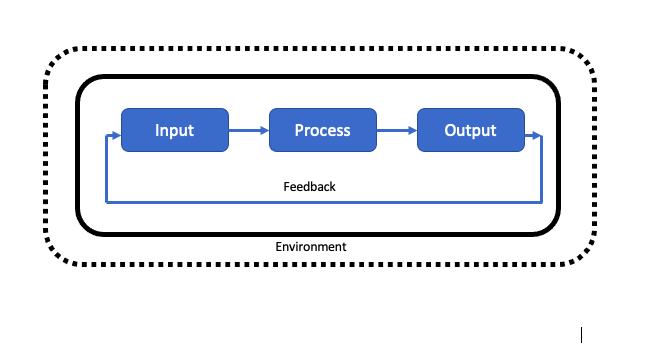
Basic interacting components of a system.
Components of Information System
1) Input: It involves capturing and assembling element that enter the system to be processed. For eg, the input to a calculator is the keypad. We press keys and the keypad sends an electric signal to be processed.
2) Process: It involves transformation processes that converts input into output. The input signal are changed according to the instruction supplied to generate an output.
3) Output: It involves elements that have been produced by a transformation process to their final and ultimate destination. The output of a calculator is the scree.
4) Storage: Storing for future so that we can retrieve and access whenever required.
5) Controlling: Monitoring the overall data and resources flow is known as controlling.
6) Feed back: Feedback is the idea of monitoring current output of the system and comparing it with the system goal.
7) System boundary: The system boundary defines the components that make up the system and scope of the organization which can be changed during system design.
8) System Environment: Anything outside the system boundary that may directly or indirectly affect the system behavior is system environment.
Information System term
Data: It is the raw facts and figures which are uninterpreted, unrelated and isolated and doesn't give any sense are known as data. Data can be collected from various sources such as interview, observation, sampling, measuring, questionnaire, etc. Data are ta transformed into information after processing which may later help in decision making
Eg, Global, 12, Pokhara, School
Information: Information is the processed form of data. It is organized, interpreted, corrected form of raw facts and figure. It is the processed data into a form that is meaningful to the user so that decision maker may take necessary action.
Eg, Global is a school located in Pokhara-12
Definition of Information system:
The system which accepts data as Input, process it to generate the information and provides the information to the user as output is the information system. The information system is interrelated components working together to collect data, process it, give output and store using the resources of hardware, software, people, procedure & controlling mechanism.
It helps to support decision making, coordination, control, analysis and visualization in an organization. The major objective of an information system is to provide information on timely basis throughout the organization. So that top level management can make proper decision and take appropriate course of action in time.
Types of the information system.(very important)
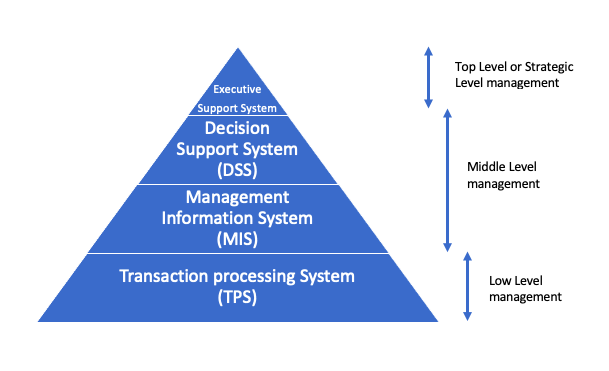
In an organization, there are various types of operations that takes place. Several operation requires several information system for the effective management of an organization. Senior managers need information to help with the business planning. Middle management need more detail information to help them monitor and control business activities. Employees with operation roles need information to help them carry out their duties. Hence, business organization tends to have several information system operating at the same time. The several information system are:
Types of Information System
Different level of Information system
1) Transaction processing system (TPS): A TPS is a basic business system which serves the most elementary day to day activities of an organization. It supports the operational level of the business that supplies data for higher level management for decision. A TPS also collects and stores information about transaction and control some expect of transaction, which includes the collection, modification and retrieves of all transaction data. TPS is also known as real time processing. For example, billing system to send invoice to customer, inventory management system to keep record of purchase, sales and stock.
2) Management Information system (MIS): Management information system provides information to manager of an organization which helps them to organize, evaluate and efficiently manage departments within an organization. It is primarily intended for providing information from the data after processing them. The data are generated, collected recorded, stored, processed and retrieved by MIS after it has been generated by business operation or TPS in an organization. It is the system that provides the information necessary to manage and organization effectively. It has large quantity of input data obtained from TPS and produce summary report as an output. It is used by middle level management. For example, annual budgeting system, auditing system etc
3) Decision Support system (DSS): It is a computer based application that collects, organize, and analyze business data to facilitate quality business decision making for management, operation and planning. This system aid decision maker in compiling a variety of data from of data from many sources. DSS analysis helps companies to identify and solve problem and make decision. It is created to help people to make decision by providing access to information and analysis tool. It support the decision process so manager can make simulation and prediction. DSS allows user to use different option and find out what the outcome would be so that proper action con be identified. DSS is flexible, adaptable and quick.
4) Executive support system: It is also known as executive information system. It is a decision support system used to assist senior executive in the decision making process. It does this by providing easy access to important data needed to achieve strategic goals in on organization. ESS normally features graphical display on an easy to use interface. ElS can be used in many different type of organization to monitor enterprise performance as well as to identify opportunities and problems.
System Analyst
The person who is involved in analyzing, designing, implementing and evaluating, computer based information system to support decision making and operation of an organization is known as system analyst. He/she is a computer specialist person who is in charge of designing, modifying and analyzing various system to ensure compatibility and user effectiveness. A system analyst used computers and related system to design new IT solution, modify, enhance, or adapt existing system and integrate new feature or improvement all with the aim of improving business efficiency and productivity. They must posses a high level of technical expertise and have depth knowledge of current business practices.
Attributes qualities of good system analyst/desirable characteristics or qualities
1) Knowledge of an organization: A system analyst must understand way in which various functions of an Organization. He/she should have insight view of management structure, objective of an organization and the relationship among the department in the organization. He/she should know the principle end policies of an organization for whom the information system is to be built. In general he/she should have great knowledge of business practices.
2) Communication skill: Effective communication skill is vital for the success of any system. The system analyst should have ability to articulate and speak with all levels of managerial position of an organization. He/she is required to influence people to change their mind and attitude and motivate them to work in group.
3) Technical knowledge: System analyst should have the knowledge of basic of computers and business functions. He/she must be familiar with the capabilities and limitations of hardware and software products. He/she should possess good and enough technical knowledge so that he/she can recommend and implement new information system.
4) Creativity: The analyst should be creative enough to generate ideas and views that can help different executives in decision making process and help organization to increase its efficiency and productivity. He/she should be innovate enough to design and implement new system.
5) Problem solving: System analyst should have the skill of problem solving, developing alternative solutions scheduling and co-ordinating team effort and managing cost and account. He or she should posses deep intellectual capacity, and should be able to diagnosis problem critically.
6) Dynamic interface: System analyst must be a perfect of both technical and non-technical skill. He/she should have potential of dealIng with technical issues and management function.
Roles and responsibilities/Duties
1) Defining requirement: It involves understanding users requirement by interviewing, finding out what information is being used and what is their expectation towards purposed system. He/she should be capable of recommending appropriate information system to solve the specific problem of two user.
2) Analyst and evaluation: The system analyst analyze the working of current information system in the organization and find out the best characteristics of existing system and evaluates if new system modification is required.
3) Gathering data facts and opinion of user: Since, System analysis may recommend information system on behalf of user so he/she should gather actual and appropriate data before recommending. His/her purpose system should fulfill the requirement of the user. Hence, proper communication between user and analyst is required to gather important ideas and opinion.
4) Prioritizing requirement: System analyst should be able to prioritize the requirement of the user that means the requirement of the user may not always be useful so he or she should be able to filter or sort out the requirement according to the priority by making communication with user.
5) Designing system: It is one of the important responsibilities of system analyst to design the system according to the requirement of the user. Designs are frame work for the development of the system. Hence, system analyst should understand the need of the user and incorporate that need in a proposed system through design.
System Development Life Cycle (SDLC)
System is defined as an integrations of objects of the real world environment joined in some regular interaction. The process of developing system by set of predefined steps is called system development life cycle. We need system development lifecycle due to following reasons. Computer based processing enables the same data to be processed in many ways according to the need.
It is easier to handle large volume of data and deal with variety of information.
It is easier to handle organization having distributed branches.
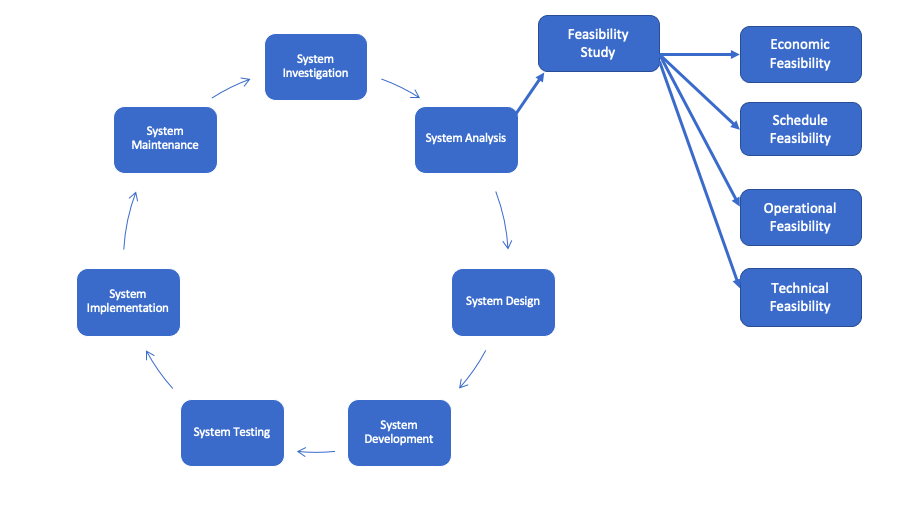
The software development lifecycle consists of following phases:
Software Development Life Cycle
1) System investigation: It is the preliminary way of handling the user request to change, improve or enhance existing system. The objective is to determine the user requirement, whether the request is valid and feasible. In this phase, problem definition is well understood, as system intended to meet the need of an organization. Thus, the first step in the design is to specify these needs for requirements. The top manager of an organization takes the basic decision to use a computer based information system for managing the organization. During this phase the objective of the system are identified. In general system Investigation studies the following questions. What is to be done in the future?
How to do it?
When to do it?
Who will do it?
2) System analysis: The process of analyzing a system and trying to find a way to modify it or create a new system to meet the users need. In other words, the investigation into system operation and possible changes to the system is called system analysis. The system are made up of many interrelated task, change to any one of this task to the addition of new task may affect the existing one. Therefore, it is necessary to understand the system and its problem which will help to reduce the failure due to any risk and uncertainties. Main activities which are undertaken in this phase.
Definition of output requirements such as content, layout design etc.
Specification of input data such as source, format etc.
Development of overall logic.
Develop step by step algorithm and flowchart.
Develop a general test requirement
3) Feasibility studies (V.imp): The process of analyzing whether the proposal is feasible or not is known as feasibility study. If it is not feasible then we have to look after other alternative. Feasibility study mainly focus on the demand of the system that affects the overall the development of the information system. Feasibility is how beneficial or practical the development of an information system will be to an organization
The aim of feasibility study Are.
To determine whether the objective stated can be early attainable within a prescribe limitation and period.
To define major problem areas so that system analyst can plan the strategy for the field investigation.
To find areas where we can save time money and effort.
To prepare cost estimation and time scheduling.
To discover the areas where specialist knowledge are required.
Different types of feasibility study.
a) Economic feasibility: The system development said to be economically feasible if the budget on proposed system doesn't ought weight, the estimated cost involve in acquiring, installing and operating it. Cost can be one time or continuing and can occur at various time during project development and use. It mainly measures cost, savings, and benefits. During economic feasibility the cost of the following things are to be measured.
People including IT staff and user.
Hardware and equipment
Software
Formal and informal training
License and fees
Facility cost
b) Schedule feasibility (time): A system development is said to be schedule feasible if time required to accomplish the project doesn't cross the proposed deadline. It is called schedule feasibility. The schedule feasibility also depends upon available manpower and economical condition as well. In practice, time period of project completion should be always less than or equal to time required then proposed time, then only the system will be schedule feasible.
c) Technical feasibility: A system development is said to be technically feasible if the organization has the resources to develop or purchase, install and operate the system. It measures the availability of appropriate manpower required to accomplish the project. If the manpower used are not technical or the work performance of the technical manpower are not experienced the entire system will be certainly insufficient and this will distract the achievement of its goals and objectives, Technical feasibility measures following things.
Does the company have the need of technical expertise? If not can it be acquired ?
Does the company have necessary hardware, software and network resources?
d) Operational feasibility: A system that has operational feasibility is one that will be used effectively after it has been developed. If user have difficulty with a new system it will not produce the expected benefit. Operational feasibility depends on several issues. Some are performance of employees, information, economy, control, efficiency and service. A system which is operationally feasible will win it day to day activities smoothly without any delay and disturbance.
4) System design: System design is the process of creating alternative solutions to satisfy the investigated goals, evaluating the choices and drawing up the specification for the chosen alternative. Design begins after the study team has analyzed the current procedure. Since many factor have been bearing on the design process, it can be challenging. After analyzing the current system the job of the designer is to decide whether the benefits and possible savings expected from design alternative out weigh the cost. There are several designing tool. Some of them are algorithm, flowchart, ER diagram etc
Algorithm: The sequential system steps written in order to solve a particular problem is known as algorithm. Eg, Algorithm to find greatest number among two numbers.
Step 1: Start
Step 2: Enter any two number (a, b)
Step 3: Check whether (a>b)
If true: Go to step 4 and stop
If false: Go to step 5 and stop
Step 4: Display greatest number is ‘a’
Step 5: Display greatest number is ‘b’
Step 6: Stop
Flowchart: The diagrammatic representations of steps involved while solving a particular problem is called flowchart.
5) System Development (Coding): Coding the process of writing programs using actual programming language. In the phase solutions are created using real program code. In general, the system design needs to be implemented to make it a workable system. This demands the coding of design into computer language i.e. programming language (machine level language, high level language, assembly language). This is also called the programming phase in which the programmer converts the program specification into computer instruction, which we refer to as program. The programs co-ordinate the data movement and control the entire process in a system. A well written code reduces the testing and maintenance effort. This helps in fast development, maintenance and future changes if required programming tools like compiler, interpreter and languages like C, C++, Java script, PHP etc are used for coding. With respect to the type of application, appropriate programming language should be chosen.
6) System Testing : This steps includes whether the developed system can fulfill the user requirement or not. The testing is the process of validating the correctness of program. It's objective is to demonstrate that the program meets its designed specification. It is an investigation conducted to provide stake holder with information about the quality of the product or service under test. Some of the objective of system testing are :
To check whether developed system fulfills the user requirement or not.
To check whether developed system works as expected.
Some testing methods are:
a) Black box testing: Black box testing treats the software as a black box without any knowledge of internal implementation. It is also called functional testing because it tests whether a system is functioning or not. Here in this type of testing several known input is provided and checked whether the system generates expected output or not.
b) White box testing: In white box testing, procedural details are checked logical path through the software and between several components are tested through codes, statements and syntax analysis. White box testing is used when the tester has to the internal data structure and algorithms including the code that implement this. It is also called glass box testing.
7) System implementation: The main objective of this phase is to obtain an operational system fully documented. In the phase system are installed and tested with operational data. It also consist of implementation of the system into production environment and resolution of the problem identified in testing phase. Implementation generally refers to the use of newly developed system in practice. when the software appears to be running properly then we understand it is ready to implement. The main activities of implementation phase are:
Testing and proving in all parts of system.
Training of data processing and user staff to use the new system.
Preparation of documentation of a system.
Acquiring all necessary equipment & stationary.
8) System maintenance: When the system is implemented, maintenance and modification begins. like any system, there is an aging process that requires periodic maintenance of hardware and software. There may be need of new modification which are done in this phase. The software and hardware requires periodic maintenance to as to keep in tune with design specification and to innovate new ideas into the system. The different types of maintenance are:
Corrective maintenance: It corrects the run-time error during the operation.
Adaptive maintenance : It modifies or add new feature in the system according to the environmental change.
Perfective maintenance. It makes the system perfect up to date and improve the life and efficiency of the system.
System Development Model
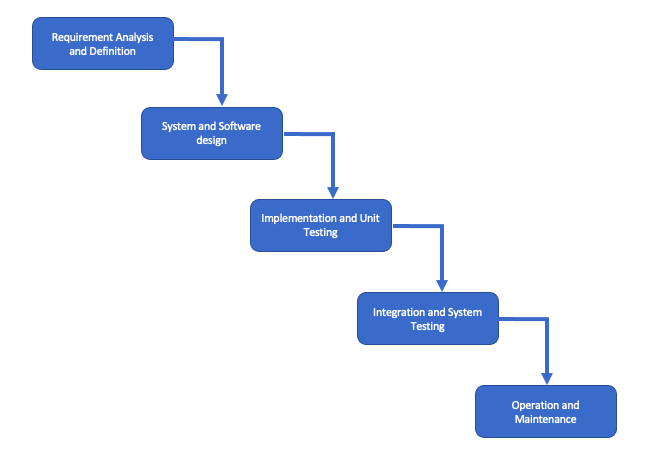
A) The waterfall Model:This model is some time called classic life cycle because it suggest a systematic sequential approach to software development that begins with customer specification of requirements and progress through planning, modeling, construction etc. It is an oldest type of model for software engineering. It takes the fundamental process activities of specification, development, validation and evolution & represents them as separate process phases such as requirements specification, software design, implementation testing and so on.
Waterfall Model
a. Requirement analysis & definition: In this stage the system's services constrain and goals are established by consultation with system users. They are defined in details and serve as system specification.
b. System and software design: In this stage the system design process partition the requirements to either hardware or software system. It establishes overall system architecture. Software design involves identifying and describing the fundamental software system abstraction and their relationship.
c. Implementation and unit testing: During this stage, the software design is realized as a set of programs or program unit testing involves verifying that each unit meets its specification.
d. Integration and system testing: The individual programs units or programs are integrated and tested as a complete system to ensure that the software system is delivered to the customer.
e. Operation and maintenance: Normally, this is the longest life cycle phase. The system is the installed and put into practical use, maintenance involves correcting errors which are not discovered in earlier stage of the life cycle improving the implementation of system units and enhancing the system service as a new requirements are discovered.
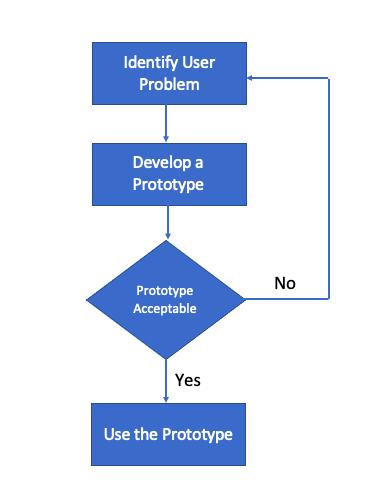
B) Prototyping Model: This model is applied when there is an absence of detail information regarding input and output requirement of a software. Prototype model is suitable when the requirement of the client is not clear and it is supposed to be changed. It doesn't cover any risk management.
Prototype Model
Development of prototype.
Identify user problem: The system analyst interviews the user to obtain an idea of what is required from the system.
Develop a prototype: The system analyst, working with other information specialist uses one or more prototyping tool to develop a prototype.
Determine if prototype is acceptable: The system analyst educates the user in prototype and provides an opportunity becoming familiar with the system. The user advises the analyst whether the prototype is satisfactory or not. If yes then the prototype will be used if not again the loop continues from beginning.
Use the prototype: The prototype becomes operational system.
Advantages of prototyping model
Helps in reducing risk associated with the the project.
There is great involvement of user in software development.
Disadvantages of prototyping model
Time consuming and expensive because if the user is not satisfied by the developed prototype new prototype should be developed. This process goes on until a perfect prototype is developed which satisfies the user.
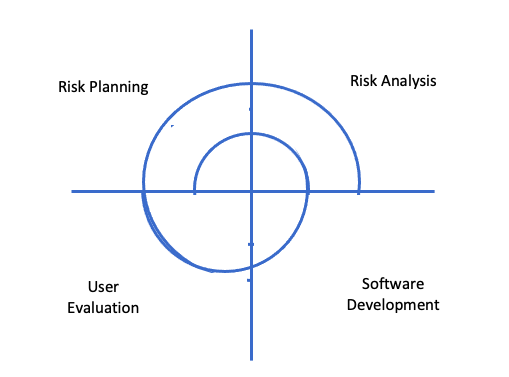
C) Spiral model:In this model, process is represented as a spiral rather than a sequence of activities with back tracking. Each loop in the spiral represent a phase in the process. It has no fixed phase such a specification or design. Loops in the spiral are chosen depending upon what is required. This model combines the feature of both waterfall model and prototype model. The spiral model is favorable of large, expensive and complicated projects. It is a system development method in Looping structure. In this model planning, risk analysis, software development and user evaluation are repeatedly processed until the system performed correct output.
Spiral Model
Planning: The project is reviewed and the decision is made whether to continue with a further loop of a spiral. If it is decided to continue, plan has to be drawn up for the next phase of the project.
Risk analysis: For each of the identified project risk, detail analysis is carried out. Steps are taken to reduce the risk. For example: if there is a risk that the requirement are inappropriate, a prototype system may be developed.
Software development: After risk evaluation a development model of the system is chosen.
User evaluation: Specific objective for the phase of the project are defined by the evolution of the user. Here, user requirement and the product are identified and checked whether it fulfills the specification or not.
Advantages of spiral model
It emphasize on risk, which are often ignored.
Some phases are in loop, it is effective for regular updates.
Effective user feedback.
It emphasize on quality.
Disadvantageof spiral model
Full scale risk analysis need training and maybe expensive. Hence, it is only applicable for large project.
This model is relatively untested.
System design tool
Various system design tool are used during system analysis and design phase of system development. Some of the most commonly used tools are algorithm, flowchart, entity relationship (ER) diagram , data flow diagram (DFD) etc.
1) Algorithm: The sequential steps or step by step procedure written to solve particular problem is called algorithm. It is one of the most basic tools used for solving problem. It is defined as the finite sequence of instruction for solving a problem. It consists of step wise list of English statement making sequential procedure. The number of instruction should be minimized to increase the speed of an algorithm.
2) Flowchart: The pictorial or diagrammatic representation of steps involved while solving problem. It is defined as a diagram or picture which describe the procedure how to solve a problem. It shows the order of instruction and relationship between them. The purpose of constructing flowchart is to help the programmer for understanding the logic of the problem. There are two types of flow chart.
Program Flowchart: It is the type of flowchart that explains how a particular program solves a given tasks. It helps to get an understanding on how to solve the problem using the programs· Since it solves only one type of problem at a time, it is very easy to understand. Different symbols used in program flowchart are:
System flowchart: A system flowchart plays vital role in system analysis. It illustrates the elements graphically and characteristics of a system, its structure and relationship in terms of flowchart symbol. A system flowchart is a diagram that shows a broad overview of the data flow and sequences of operation in a system. It is the graphical representation of a sequence of activities in a process of a system.
Program Flowchart
System Flowchart
i. It gives detail of any particular part of the system.
1. What are the programming methods or approaches of program development?
There are two approaches of program development. They are Procedure Oriented Programming and Object-Oriented Programming. Procedure Oriented Programming is a conventional method of programming and the Object-Oriented Programming is a modern or latest programming method.
2. What is Procedure Oriented Programming?
It is a conventional or old method of programming, in which the program is written into many small parts and combined together. In this approach, the functions are created and the data is not very crucial. Variables are created for the data handling and they are treated as the global and local variables. Creation of the variables inside of the sub programs is known as local variable and the creation of the variables in the main module is called the global variable. Global variables can be accessed from any modules but the local variables can be accessed only within the local modules. The alteration of data is very high.
3. What are the features of Procedure Oriented Programming?
The characteristics or features are as follow:
a) A large program is broken down into small programs or procedures.
b) It focuses on the functions rather than the data.
c) Variables are created as local and global.
d) The possibility of data alteration is very high, which is the main disadvantage of this approach.
e) It follows top down method.
4. What is Object Oriented Programming?
It is a modern approach of programming. It is highly known as OOP in short form. In this method, all the real world entities are treated as the objects and objects are collected in a class. Even the classes are controlled by the Super class. And by the inheritance feature, the changes on the super class are easily passed to its sub classes. Similarly, it was developed to overcome procedure oriented programming method and the data is given high priority rather than the functions. Data can be hidden, so that the possibility of data alteration is very less.
5. What are the characteristics of OOP?
The characteristics of OOP are:
a) Emphasis is given to the data.
b) Program are divided into multiple objects.
c) Functions and data are tied together in a single unit.
d) Data can be hidden to prevent accidental alteration.
e) It follows the bottom up approach.
6. What are the differences between Procedure Oriented and Object Oriented Programming?
The have the following differences: (Click here for more in detail)
Procedure Oriented
Object Oriented
a. Emphasis is given to procedures.
a. Emphasis is given to data.
b. Programs are divided into multiple modules.
b. Programs are divided into multiple objects.
c. It follows top-down method.
c. It follows bottom-up method.
d. Generally data cannot be hidden.
d. Data can be hidden.
e. It does not model the real world perfectly.
e. It models the real world perfectly.
f. Maintenance is difficult.
f. Maintenance is easy.
g. Code reusability is difficult.
g. Code reusability is easy.
Examples: FORTRAN, COBOL, Pascal, C, etc.
Examples: C++, JAVA, Smalltalk, etc.
7. Write short notes on the following:
a) Object
All the entities of a program used in OOP method are called objects. Here entities represent a group of people, teachers, students, books, cars, etc. Each entity or object does have an attribute called characteristics and the behavior or functions. For example, a car can be an object. The colour like blue, black, size, weight, etc. are the attributes or the characteristics, which distinguishes to it with other objects and move, turn, etc. can be the functions.
b) Class
Class is a user defined data type in OOP, which defines the data types for all the objects, which run under it. Or it collects the objects of its similar data types. For example, a class vehicle can have the objects like car, bus, truck, etc. Similarly a class school can have students, teachers, staff, etc.
c) Abstraction
It is a feature of hiding internal detail of any object. It provides only the interface to the user, which makes them easy to use but does not show the details of that object, how that works and how that is made. Due to this feature, OOP has become very secure platform for its data from being accidental alteration.
d) Encapsulation
It is a process of combining the data and functions together. OOP gives more emphasis on the data rather than the functions or procedures. Many functions can use the same data but the instruction given to the function to use any particular data and combining them together is the encapsulation. Due to its unrelated functions cannot use unnecessary data in the program.
e) Inheritance (Imp.)
Inheritance is the process of creating new classes based on the existing class. The new classes require the features of the main class called the Super class and it is provided through the feature called Inheritance. By the Inheritance feature Super class can coordinate with it’s sub classes. It models the real world. It allows the extension and reuse of existing code without having to rewrite for the new created classes.
f) Polymorphism
It is a feature of OOP, which refers to the way of operating the same operator in different ways and different method or purpose. Operator overloading and the operation overloading are the examples or Polymorphism. For example ‘+’ operator can be used for arithmetic operation and string concatenation both. This facility or feature is an example of Polymorphism. It reduces the number or keywords or operators.
8. What are the advantages and disadvantages of OOP? (most imp)
Advantages:
a) Code repetition is reduced by the various techniques like inheritance.
b) Data is more secure due to the data hiding feature called abstraction.
c) Existing classes can serve as library class for further enhancements.
d) Division of a program into multiple objects makes the software development easier.
e) Software complexity is less.
f) Upgrading and maintenance of software is easy.
g) It perfectly models the real world system.
h) Code re-usability is much easier than the conventional programming system.
Disadvantages
a) Compiler and runtime overhead is high.
b) Software developer should analyze the problem in object oriented way.
c) Requires the mastery in software engineering and programming methodology.
d) Useful only for the large and complex projects.
Functions: Functions are the self-contained program that contains several block of statement which performs the defined task. In C language, we can create one or more functions according to the requirements.
Usually, In C programs flows from top left to right bottom of main() functions. We can create any number of functions below that main() functions. These function are called from main() function. Requirement while creating a functions.
a) Declare a function
b) Call statement
c) Definition of function.
After the function is called from the main(), the flow of control will return to the main() function.
Program example of function
//WAP to calculate simple interest using function
#include <stdio.h>
#include <conio.h>
float interest(void); //function declaration
int main()
{   float si;
    si=interest(); //function call
    printf("Simple interst is %.2f\n",si);
    return 0;
}
float interest() //function definition
{
    float p,t,r,i;
    printf("Enter Principal, Time and Rate");
    scanf("%f%f%f",&p,&t,&r);
    i=(p*t*r)/100;
    return i; //function return value
}
//WAP to calculate area of rectangle using function.
#include <stdio.h>
#include <conio.h>
int area (void);
int main()
{
	int a;
   	a = area();
	printf("area is %d",a);
   	return 0;
}
int area()
{
	int l,b,ar;
	printf("Enter length and breadth");
	scanf("%d%d",&l,&b);
	ar = l*b;
	return ar;
}
Advantage:
1. Big programs can be divided into smaller module using functions.
2. Program development will be faster.
3. Program debugging will be easier and faster.
4. Use of functions reduce program complexity.
5. Program length can be reduced through code reusability.
6. Use of functions enhance program readability.
7. Several developer can work on a single project.
8. Functions are used to create own header file i.e mero.h
9. Functions can be independently tested.
Recursive functions: (V.Imp)
Those function which calls itself is known as recursive function and the concept of using recursive functions to repeat the execution of statements as per the requirement is known as recursion. The criteria for recursive functions are:
The function should call itself.
There should be terminating condition so that function calling will not be for infinite number of time.
Program example of recursive function
WAP to calculate factorial of a given number using recursion/recursive function. (V.IMP)
#include
int fact (int);
int main()
{
    int n,f;
    printf("Enter any number");
    scanf("%d",&n);
    f = fact(n);
    printf("factorial is %d",f);
    return 0;
}
int fact (int n)
{
    if (n<=1)
        return 1;
    else
        return (n*fact(n-1));
}
WAP to calculate sum of n-natural number using recursion/recursive function.
#include
int sum (int);
int main()
{
    int n,s;
    printf("Enter any number");
    scanf("%d",&n);
    s = sum(n);
    printf("Sum is %d\n",s);
    return 0;
}
int sum (int n)
{
    if (n<=0)
        return 0;
    else
        return (n+sum(n-1));
}
Pointer (v-imp)
Pointers in C are similar to as other variables that we use to hold the data in our program but, instead of containing actual data, they contain a pointer to the address (memory location) where the data or information can be found.
These is an important and advance concept of C language since, variables names are not sufficient to provide the requirement of user while developing a complex program. However, use of pointers help to access memory address of that entities globally to any number of functions that we use in our program.
Importance of Pointer.
While using several numbers of functions in C program, every functions should be called and value should be passed locally. However, using pointer variable, which can access the address or memory location and points whatever the address (memory location) contains.
Pointer declaration
Data_type *variable_name
Eg, int *age;
Advantages
1. It helps us to access a variable that is not defined within a function.
2. It helps to reduce program length and complexity i.e. faster program execution time.
3. It is more convenient to handle datas.
4. It helps to return one or more than one value from the functions.
Program example:
#include
int main()
{
    int n,*ptr;
    printf("Enter any number");
    scanf("%d",&n);
    ptr =&n;
    printf("Value is %d\n",*ptr);
    return 0;
}
Example: union sample{ int a; float p; char n[10] } a;
File Handling in C
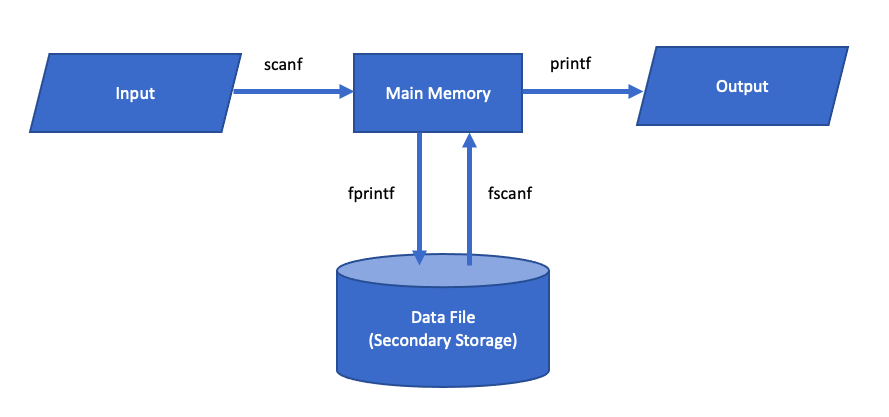
As we know, while program is in execution the content of variables are temporarily stored in main memory i.e. RAM. Data reside temporarily in RAM only at the time of program execution. After the completion of execution data gets erased away which means the data cannot be used for future references. To overcome this problem, file handling comes into existence through which we can store data permanently in our secondary storage and retrieve it whenever in future. Data arestored as datafile in our disk.
File handling in C
Opening a data file
Syntax:
FILE *fptr
fptr = fopen (“filename” , ”mode”)
Where, File name can be “library.txt”, “student.dat” ..etc
Mode:
“w” to write/store data in a data file.
“r” to display/read/retrieve/access data from a datafile.
“a” to add/append data in existing datafile.
Store/write data
Syntax:
fprintf(fptr , ”format specifiers” ,variables);
Eg; suppose if we want to store name, disease, age and bed number of a patient then, it is written as
fprintf(fptr , ”%s %s %d %d”, n, d, a, b);
Where, variable are initialized as:
char n[10], d[10];
int a, b;
Program example
1) Create a datafile “patient.txt” and store name, disease, age and bed number of a patient.
#include
int main()
{
    char n[10], d[10];
    int a, b;
    FILE *fptr;
    fptr = fopen(“patient.txt”,”w”);
    printf("Enter name, disease, age and bed number");
    scanf(“%s %s %d %d”, n, d, &a, &b);
    fprintf(fptr,"%s %s %d %d\n”, n, d, a, b);
    fclose(fptr);
    return 0;
}
[Note: This program will store only single record to store multiple record we have to use loop as following programs.
2) Create a datafile “student.txt” and store name, class and marks obtained in 3 different subject for few students/n-students.
#include
int main()
{
    char n[10];
    int c, e, ne, m, i, num;
    FILE *fptr;
    fptr = fopen("student.txt","w");
    printf("How many record?");
    scanf("%d",&num);
    for(i=1;i<=num;i++)
    {
    printf("Enter name class and 3 marks");
    scanf("%s %d %d %d %d",n, &c, &e, &ne, &m);
    fprintf(fptr,"%s %d %d %d %d \n",n, c, e, ne, m);
    }
    fclose(fptr);
    return 0;
}
3) Create a datafile “student.txt” and store name, class and marks obtained in 3 different subject until user press “y” / as per user requirement.
#include
int main()
{
    char n[10],ch[3];
    int c, e, ne, m;
    FILE *fptr;
    fptr = fopen("student.txt","w");
    do
    {
    printf("Enter name class and 3 marks");
    scanf("%s %d %d %d %d",n, &c, &e, &ne, &m);
    fprintf(fptr,"%s %d %d %d %d\n",n, c, e, ne, m);
    printf("Press Y to continue");
    scanf("%s",ch);
    } while (strcmp(ch,"Y") == 0 || strcmp(ch,"y")==0);
    fclose(fptr);
    return 0;
}
Add/Append data
1) A datafile “student.txt” contain name, class and marks obtained in 3 different subject of few students. Write a C program to add 200 more records.
#include
int main()
{
    char n[10];
    int c, e, ne, m, i;
    FILE *fptr;
    fptr = fopen("student.txt","a");
    for(i=1;i<=200;i++)
    {
    printf("Enter name class and 3 marks");
    scanf("%s %d %d %d %d", n, &c, &e, &ne, &m);
    fprintf(fptr,"%s %d %d %d %d \n",n, c, e, ne, m);
    }
    fclose(fptr);
    return 0;
}
2) A datafile “student.txt” contain name, class and marks obtained in 3 different subject of few students. Write a C program to add more records until user press “y” / as per user requirement.
#include
int main()
{
    char n[10], ch[3];
    int c, e, ne, m;
    FILE *fptr;
    fptr = fopen("student.txt”,”a”);
    do
    {
    printf("Enter name class and 3 marks");
    scanf("%s %d %d %d %d", n, &c, &e, &ne, &m);
    fprintf(fptr,"%s %d %d %d %d\n", n, c, e, ne, m);
    printf("Press Y to continue");
    scanf("%s",ch);
    } while (strcmp(ch,"Y") == 0 || strcmp(ch,"y")==0);
    fclose(fptr);
    return 0;
}
Read/Display/retrieve/access data from a datafile
Syntax:
fscanf(fptr , ”format specifiers” ,variables);
Eg; suppose if we want to display/read name, disease, age and bed number of a patient from data file then, it is written as
fscanf(fptr , ”%s %s %d %d”, n, d, &a, &b);
Where, variable are initialized as:
char n[10], d[10];
int a,b;
EOF: End of file
Program example
1) A datafile “student.txt” contain name, class and marks obtained in 3 different subject of few students. Write a C program to read and display all records.
#include
int main()
{
    char n[10];
    int c, e, ne, m;
    FILE *fptr;
    fptr = fopen("student.txt","r");
    printf("Name\tPercentage\n");
    while(fscanf(fptr,"%s %d %d %d %d",n,&c,&e,&ne,&m) != EOF)
    {
        printf("%s %d  %d  %d  %d", n, c, e, ne, m);
    }
    fclose(fptr);
    return 0;
}
2) A datafile “student.txt” contain name, class and marks obtained in 3 different subject of few students. Write a C program to read and display only records whose name is Ram.
#include
int main()
{
    char n[10];
    int c, e, ne, m;
    FILE *fptr;
    fptr = fopen("student.txt","r");
    while(fscanf(fptr,"%s %d %d %d %d",n,&c,&e,&ne,&m) != EOF)
    {
       strlwr(n);
       if (strcmp(n,”ram”) == 0)
       {
        printf("%s %d  %d  %d  %d", n, c, e, ne, m);
       }
    }
    fclose(fptr);
    return 0;
}
3) A datafile “student.txt” contain name, class and marks obtained in 3 different subject of few students. Write a C program to read and display only records who pass in all subjects.
#include
int main()
{
    char n[10];
    int c, e, ne, m;
    FILE *fptr;
    fptr = fopen("student.txt","r");
    while(fscanf(fptr,"%s %d %d %d %d",n,&c,&e,&ne,&m) != EOF)
    {
       if (e>=40 && ne>=40 && m>=40)
        {
          printf("%s %d  %d  %d  %d", n, c, e, ne, m);
        }
    }
    fclose(fptr);
    return 0;
}
4) A datafile “student.txt” contain name, class and marks obtained in 3 different subject of few students. Write a C program to read and display only records who fail in any one subject.
#include
int main()
{
    char n[10];
    int c, e, ne, m;
    FILE *fptr;
    fptr = fopen("student.txt","r");
    while(fscanf(fptr, "%s %d %d %d %d", n, &c, &e, &ne, &m) != EOF)
    {
       if (e<40 || ne<40 || m<40)
      {
        printf("%s %d  %d  %d  %d", n, c, e, ne, m);
      }
    }
    fclose(fptr);
    return 0;
}
5) A datafile “student.txt” contain name, class and marks obtained in 3 different subject of few students. Write a C program to read and display only name and percentage of all students
#include
int main()
{
    char n[10];
    int c, e, ne, m;
    float p;
    FILE *fptr;
    fptr = fopen("student.txt","r");
    while(fscanf(fptr, "%s %d %d %d %d", n, &c, &e, &ne, &m) != EOF)
    {
        p = (e+ne+m)/3;
        printf("%s %f", n, p);
    }
    fclose(fptr);
    return 0;
}
6) A datafile “student.txt” contain name, class and marks obtained in 3 different subject of few students. Write a C program to read and display only records of all students who secure distinction.
#include
int main()
{
    char n[10];
    int c, e, ne, m;
    float p;
    FILE *fptr;
    fptr = fopen("student.txt","r");
    while(fscanf(fptr, "%s %d %d %d %d", n, &c, &e, &ne, &m) != EOF)
    {
       p = (e+ne+m)/3;
       if (p>=80)
       {
        printf("%s %d  %d  %d  %d", n, c, e, ne, m);
       }
    }
    fclose(fptr);
    return 0;
}